
How to Choose a WiFi Spy Pen Camera for Remote Monitoring in 2026
There is a fundamental difference between a pen that records and a pen that streams. The first stores footage on a local memory card and requires physical retrieval. The second connects to your phone or computer over WiFi and lets you watch what is happening in real time, from anywhere in the world, as long as you have an internet connection. If you need remote monitoring capability — checking on a meeting room from your desk, verifying activity in a home office while traveling, or monitoring a care situation from another floor — then a WiFi spy pen camera is the tool that actually does the job. The A57 WiFi Pen Camera from QZT represents the current generation of this product category, combining 1080p recording, dual-mode WiFi connectivity, and a fully functional writing instrument in a single device.
What Is a WiFi Spy Pen Camera and How Does It Differ from Standard Pen Cameras
A standard pen camera records to an internal or removable SD card and stores footage locally. To review what was recorded, you need physical access to the device — you plug the card into a computer, connect the pen via USB, or remove the storage and read it on another device. This works fine if you always have access to the device afterward. But in many surveillance scenarios, you do not.
A WiFi pen camera solves this by embedding a wireless module that connects to your local network or creates its own access point. This opens two primary use cases that a non-WiFi pen cannot handle. The first is remote live viewing — you open an app on your phone and watch the camera feed in real time, regardless of whether you are in the next room or on another continent. The second is remote storage access — footage recorded to the SD card can be downloaded over WiFi without removing the card from the device. Both capabilities collapse the feedback loop that makes physical access to the device a requirement.
The A57 WiFi Pen Camera from QZT adds Tuya platform integration, which means it works with the same smartphone application ecosystem used by QZT’s range of covert cameras, smoke detector cameras, and clock cameras. If you are running multiple surveillance devices, a unified app experience reduces operational complexity significantly.
How WiFi Connectivity Works: AP Mode vs STA Mode
Understanding WiFi mode is the single most important technical concept for using a WiFi pen camera effectively. Most models, including the A57, support two distinct connection modes that serve fundamentally different purposes.
AP Mode (Access Point Mode) creates a direct WiFi connection between the pen camera and your phone, without requiring any router or internet connection. The pen broadcasts its own WiFi signal, and your phone connects to it as if it were a home network. Range in AP mode is typically 10-30 meters depending on environmental obstacles. This mode works anywhere — in a car, in a hotel room, in an office with a locked network — because it does not depend on infrastructure. The tradeoff is that your phone cannot simultaneously use its normal internet connection while connected to the camera in AP mode, which means no remote viewing through cloud services.
STA Mode (Station Mode) connects the pen camera to your existing WiFi router. Once registered on the network, the camera becomes accessible through the Tuya application from any device on the same network, or from anywhere in the world if your router has internet access and port forwarding is configured correctly. STA mode is the setup you want for permanent installations or for monitoring a property while you are away. The camera needs to be within reliable range of your router, typically within 20-50 meters depending on wall construction.
Switching between modes is done through the Tuya application settings. Most users set up in AP mode initially, confirm the camera is working, and then switch to STA mode for everyday remote monitoring.

Technical Specifications and What They Mean in Practice
The A57 WiFi Pen Camera specifications tell a practical story when you understand what each figure means for real-world use.
1080p Full HD Recording delivers 1920×1080 pixel video at 30 frames per second. In practical terms, this is sufficient to capture facial features clearly at 2-3 meters, read text on documents or laptop screens within the camera’s viewing angle, and identify individuals in well-lit indoor environments. It is not sufficient for long-distance identification or detailed capture of small objects at distance, but those are not the use cases a pen camera is designed for.
12MP Photo Capability allows the device to capture still photographs at 4032×3024 resolution. While primarily a video tool, the still photo mode is useful when you need a quick snapshot without triggering video recording, or when still images are preferred as evidence for specific moments.
Up to 128GB SD Card Support extends local recording capacity to approximately 24-48 hours of continuous 1080p footage before the card fills. Under motion-triggered mode, storage duration extends proportionally based on activity levels. The pen automatically overwrites the oldest footage when the card is full in loop recording mode, which means it can run indefinitely without manual intervention.
Built-in Microphone captures audio alongside video. Audio quality is adequate for conversations within 3 meters in quiet environments, though background noise degrades clarity significantly in busy offices or public spaces. One button operation simplifies deployment — press to start recording, press again to stop, with no setup required in the field.
Real-World Applications for WiFi Pen Cameras
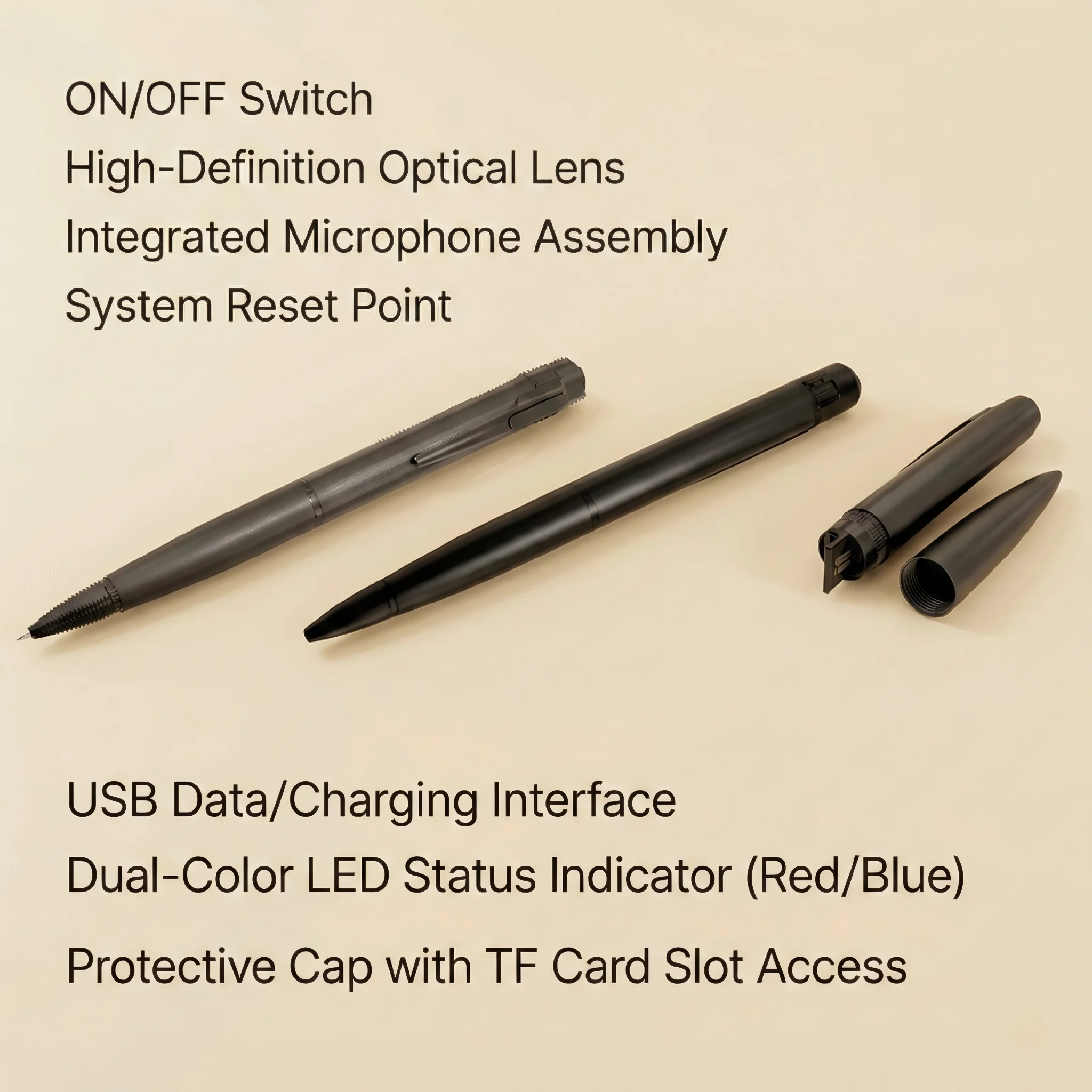
The pen camera form factor occupies a specific niche in the surveillance landscape: it is the device you carry openly, use naturally, and deploy without any special setup. A clock camera stays in one room. A wall-mounted unit covers one angle. A pen camera goes wherever you go and records from your perspective.
Meeting and Interview Documentation is one of the most common legitimate uses. Business professionals use pen cameras to record important meetings, client discussions, and internal interviews where having a full recording provides a verbatim reference that notes cannot capture. The pen writes normally while recording simultaneously, so there is no behavioral change required from the user. When the meeting ends, the footage is available for review or transcription.
Personal Safety and Evidence Collection applies to individuals who want a discrete recording device for unpredictable situations — walking alone at night, dealing with confrontational interactions, or documenting interactions with authority figures where a proper record may be needed later. The pen provides plausible deniability: it looks like a writing instrument, not a camera, which means it captures genuine behavior rather than behavior modified by the presence of a recording device.
Nanny and Caregiver Monitoring in domestic settings allows family members to verify that caregivers follow agreed-upon protocols. The pen can be placed in a room and left running, or carried by a family member who wants to document a specific interaction. Audio recording consent laws vary by jurisdiction — see the legal section below for European-specific guidance.
Field Research and Journalism professionals use pen cameras for observational recording where more conspicuous equipment would change the behavior of subjects. Academic researchers, journalists, and documentary filmmakers sometimes require covert recording as a methodological tool, subject to institutional ethics review and legal constraints.

How to Set Up and Operate the A57 WiFi Pen Camera
Setting up a WiFi pen camera for the first time takes approximately 10-15 minutes. The process breaks into four steps: app installation, device registration, WiFi configuration, and recording preference setup.
Step 1 — Install the Tuya Smart or Smart Life application. Available on both iOS and Android, the Tuya application is the control hub for QZT’s camera ecosystem. Create a free account and log in. The account enables remote access from multiple devices, which is useful if multiple people need to monitor the same pen camera.
Step 2 — Power on the pen camera and enter pairing mode. Press and hold the recording button for 5 seconds until the indicator light confirms the device is in pairing mode. In the Tuya application, select Add Device, choose Camera or Spy Camera from the category menu, and follow the in-app instructions to connect your phone to the pen’s WiFi signal.
Step 3 — Connect to your home or office WiFi. Once the pen and app are communicating, the application prompts you to enter your WiFi network credentials. The A57 connects to 2.4GHz networks. Enter your SSID and password, and the pen registers with the Tuya cloud if you want remote access outside your local network.
Step 4 — Configure recording preferences. Within the Tuya application, set your preferred resolution, enable or disable audio recording, configure motion detection sensitivity if you plan to use the pen in a stationary position, and enable loop recording so the device overwrites old footage automatically when storage is full.
Legal Considerations for Using Pen Cameras in Europe
The legal environment for covert recording devices in Europe is more restrictive than in many other markets, and the consequences for non-compliance can include criminal prosecution, civil liability, and equipment seizure. Understanding the rules before you deploy a pen camera is not optional — it is essential.
United Kingdom — The Investigatory Powers Commissioner’s Office (IPCO) and the Information Commissioner’s Office (ICO) govern surveillance device use. Recording conversations without the consent of at least one party is legal in the UK under the Regulation of Investigatory Powers Act 2000 (RIPA) for domestic purposes, but covert recording in workplace settings requires careful compliance with the ICO’s employment CCTV guidance. Recording in private spaces where individuals have a reasonable expectation of privacy — bathrooms, changing rooms — is illegal under the Protection from Harassment Act 1997 and potentially the Sexual Offences Act.
Germany — The Bundesdatenschutzgesetz (BDSG) combined with GDPR creates a strict framework. Covert recording of conversations without consent is illegal in most commercial and professional contexts. Employers face significant restrictions on monitoring employees with hidden devices, and works council involvement is typically required for any workplace surveillance scheme. Private individuals have somewhat more latitude but recording in rented accommodation without the knowledge of other residents presents legal risks.
Italy — The Garante per la Protezione dei Dati Personionali enforces GDPR consistently and sometimes strictly. Recording conversations or private activities without consent can result in significant administrative fines. Italian courts have prosecuted individuals for covert recording in workplace disputes and family law cases.
France — The Commission Nationale de l’Informatique et des Libertés (CNIL) governs surveillance device compliance. Recording without consent is legal in some circumstances but regulated. Covert recording in professional settings requires prior declaration or authorization depending on the context.
Distributors should provide buyers with a printed legal guidance sheet outlining these obligations. The A57 WiFi Pen Camera product page includes links to relevant regulatory guidance for major European markets.
Maintenance, Battery Life, and Long-Term Reliability
The A57 WiFi Pen Camera is powered by a built-in rechargeable lithium-polymer battery. Battery life under continuous recording is approximately 2-3 hours depending on WiFi mode and video quality settings. In standby mode with motion detection enabled, the device can last considerably longer between charges.
Charging is handled via a standard USB-C cable connected to any USB power source — a computer, a wall adapter, or a power bank. A full charge takes approximately 2 hours.
Storage card management requires periodic attention. The Tuya application displays remaining storage in real time, which makes it easy to check before a deployment. Format the SD card in the device settings menu every 3-6 months to maintain read/write performance. Cards that show recording errors or playback failures should be replaced immediately — a failing card can corrupt footage permanently.
The pen mechanism itself requires standard ballpoint pen refill replacement when ink runs out. The camera module does not affect the pen’s writing function, and refill replacement follows standard Parker-style ballpoint procedures. Avoid opening the pen body beyond the refill chamber, as the camera module and battery are housed in the upper section and are not user-serviceable.
Why WiFi Matters More Than You Think for Covert Recording
The leap from a standard pen camera to a WiFi pen camera is not incremental — it fundamentally changes what the device can do and who can use it. A non-WiFi pen camera is a tool for one person to review footage after the fact. A WiFi pen camera is a real-time monitoring system that extends your awareness to any location the device is deployed.
For business users, this means a manager can deploy a pen camera in a meeting room and monitor the meeting from their desk, or review footage while traveling without waiting to return to the office. For family users, a WiFi pen camera in a home office allows a working parent to check in on a caregiver’s interactions with children in another room. The real-time capability collapses the time gap between an event occurring and you becoming aware of it.
The A57’s integration with the Tuya platform also means it fits within a broader smart home or office security ecosystem. You can monitor your pen camera, your clock cameras, your smoke detector cameras, and your doorbell cameras all from a single application, with the same interface and the same login credentials. That operational consistency is valuable for users running multiple devices across a property or a small business.
Conclusion
The WiFi spy pen camera category solves a specific problem that non-networked devices cannot: remote, real-time awareness without physical access to the recording device. The A57 WiFi Pen Camera delivers 1080p video, dual-mode WiFi connectivity, up to 128GB of local storage, and full Tuya platform integration in a fully functional writing instrument.
For European distributors and B2B buyers, the pen camera fills a gap between dedicated fixed-location surveillance systems and wearable body cameras. It is portable, discreet, and requires no installation — qualities that make it appealing to a broad buyer profile including business professionals, security consultants, families with legitimate monitoring needs, and field researchers operating under appropriate ethics approvals.
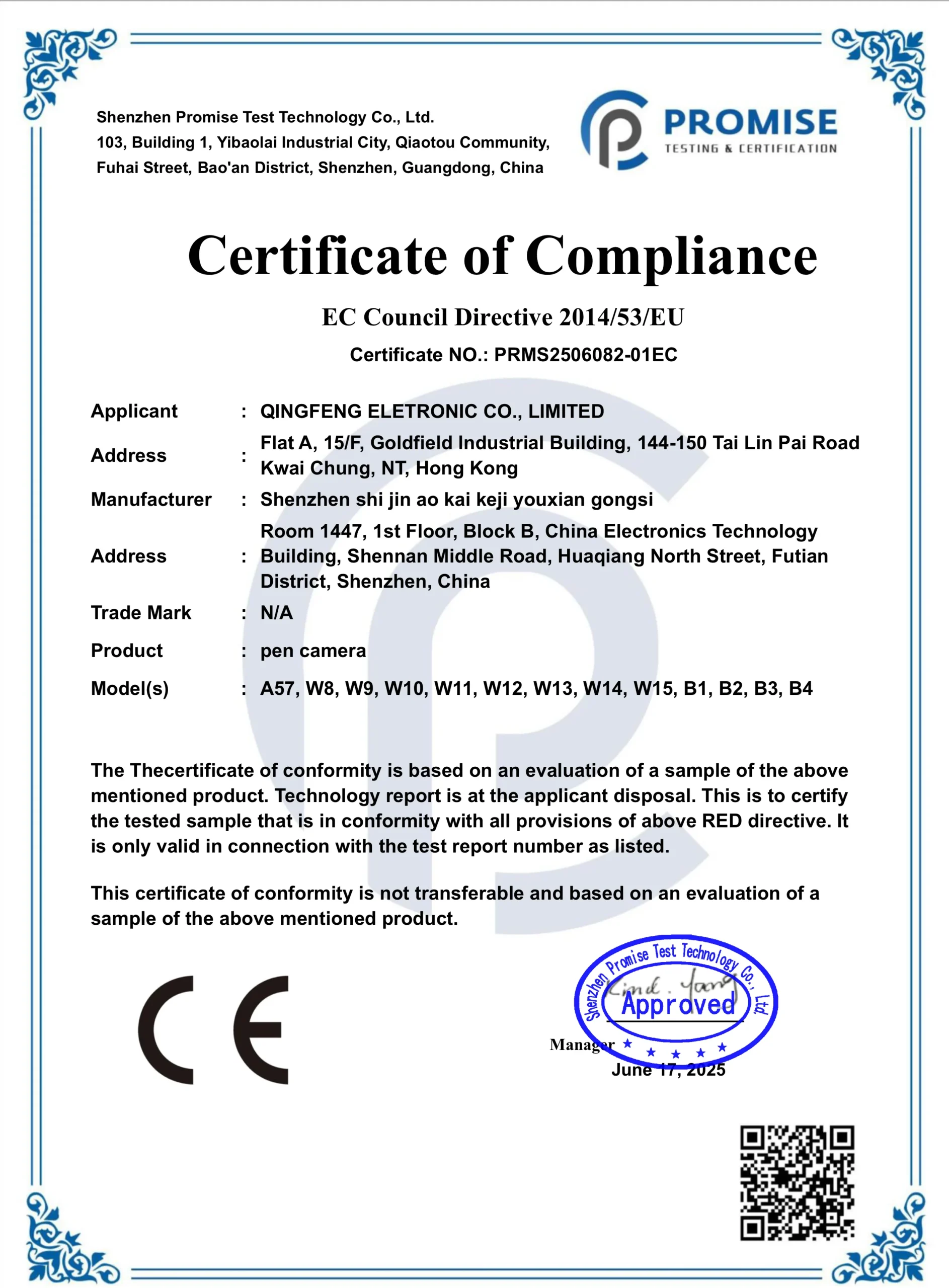
If you are sourcing covert surveillance devices for distribution, the A57 WiFi Pen Camera represents a compelling product for customers who need remote viewing capability without committing to a full fixed-camera system. Detailed specifications, volume pricing, and product certifications including CE compliance documentation are available on the QZT A57 WiFi Pen Camera product page.
Frequently Asked Questions
How far can I stream video from the pen camera using WiFi?
In AP mode (direct connection), range is approximately 10-30 meters depending on obstructions. In STA mode connected through your router, the range extends to your WiFi network coverage area, which in most homes and offices means reliable coverage throughout a standard property or small office floor.
Can I view footage from the pen camera on my computer instead of my phone?
Yes. The Tuya Smart application has a web interface accessible through a browser at home.tuyasmart.com, as well as desktop applications for Windows and macOS. You can also download recorded footage directly from the SD card using a card reader.
Does the pen camera record while I am writing with it?
Yes. The pen mechanism and the camera module operate independently. You can write normally while the camera records continuously or on motion triggers. There is no audible sound or visible indicator that filming is in progress.
What happens when the SD card fills up?
With loop recording enabled, the pen automatically overwrites the oldest footage, starting fresh from the beginning of the card. This means continuous, uninterrupted surveillance without any manual intervention. If you need to preserve specific footage, download it from the card or the app before the overwriting cycle reaches those files.
Is the A57 WiFi Pen Camera legal to import and sell in Europe?
The device itself carries CE certification, which confirms electromagnetic compatibility and electrical safety compliance for the European market. However, the legal status of the device depends on how your customers use it. As a distributor, you should include clear guidance on applicable privacy laws with every unit and ensure your product listings do not market the device for explicitly illegal purposes.
How do I switch between AP mode and STA mode?
Open the Tuya application, navigate to the camera settings within the app, and locate the network settings menu. You will find an option to switch WiFi modes. In STA mode, you enter your router credentials. In AP mode, the camera creates its own network. Note that switching modes briefly interrupts the live feed.
Can multiple people view the same pen camera simultaneously?
Yes. The Tuya platform supports multiple concurrent users. You can share device access with family members or colleagues through the app’s sharing function, allowing several authorized people to view the live feed and recorded footage at the same time.

 English
  Italiano
  Deutsch
  Français
  Español
  Polski