
Come utilizzare una telecamera nascosta: guida completa all'installazione e all'uso 2026
Acquistare una telecamera nascosta è la parte facile. Ciò che accade dopo - associarla al telefono, scegliere la modalità di registrazione corretta, posizionarla correttamente e mantenerla in funzione - è dove la maggior parte delle persone si blocca. E a differenza delle guide di configurazione generiche che trattano tutte le telecamere come identiche, questa guida copre ciò che conta realmente nel 2026: configurazione dell'app, selezione della modalità di registrazione, risoluzione dei problemi di rete e le routine di manutenzione che mantengono intatti i tuoi filmati.
Questo articolo presuppone che tu stia lavorando con una telecamera nascosta WiFi moderna — il tipo venduto da QZT Security e dalla maggior parte dei distributori affidabili. Se stai ancora decidendo quale telecamera acquistare, controlla il Guida Completa alle Telecamere Penna e Mini prima.
Apertura della confezione e configurazione iniziale: come mettere online la tua fotocamera
La maggior parte delle telecamere nascoste arriva parzialmente carica. Prima di fare qualsiasi altra cosa, inserisci la scheda SD e collega la telecamera o installa la batteria. Questo passaggio sembra ovvio, ma è il punto in cui le persone scoprono che lo slot per la scheda SD si trova sul retro del dispositivo e richiede una graffetta per aprirlo: le telecamere nascoste danno priorità alla mimetizzazione piuttosto che all'accessibilità.
Passo 1: installare la scheda SD
Apri l'articolo e individua lo slot per la scheda SD. La maggior parte delle fotocamere nascoste supporta schede fino a 128 GB. Inserisci una scheda Classe 10 o U1 per una registrazione continua affidabile: le schede più economiche hanno velocità di scrittura inferiori e causeranno salti o perdita di fotogrammi nella registrazione. Formatta la scheda SD nel menu delle impostazioni della fotocamera prima del primo utilizzo. La maggior parte delle fotocamere ti chiederà di farlo automaticamente.
Guida alla capacità della scheda SD per la registrazione continua:
| Risoluzione | Bitrate (appross.) | Capacità 64GB | 128GB Contiene |
|---|---|---|---|
| 720p | 1,5 Mbps | ~90 ore | ~180 ore |
| 1080p | 3 Mbps | ~45 ore | ~90 ore |
| 1080p + streaming WiFi | 4-6 Mbps | ~25–30 ore | ~50–60 ore |
Passo 2: Scarica l'App del Produttore
Ogni fotocamera nascosta WiFi ha un'app proprietaria. Quelle comuni includono CamHi, HiCam, V380, Yodo, e app personalizzate fornite con marchi specifici. Scaricala dal codice QR nel manuale utente o da Google Play / Apple App Store — mai da un sito APK di terze parti, poiché app modificate possono essere utilizzate per rubare le credenziali della telecamera.
Installa l'app, crea un account e concedi le autorizzazioni per fotocamera e microfono.
Passo 3: Connetti la Telecamera al WiFi
Accendi la telecamera e attendi che il LED indicatore lampeggi. Nell'app, tocca Aggiungi dispositivo or Aggiungi Telecamera. La maggior parte delle telecamere funziona in uno dei due modi:
– Modalità AP (Access Point): La telecamera crea il proprio hotspot WiFi. Connetti il telefono alla rete WiFi della telecamera (solitamente denominata qualcosa come “CAM_XXXX”), poi l'app ti guida nell'inserimento delle credenziali della tua rete WiFi domestica. La telecamera passa alla tua rete e appare nell'elenco dei dispositivi.
– Modalità Codice QR: L'app genera un codice QR contenente le credenziali WiFi. Tieni il codice QR davanti all'obiettivo della fotocamera a una distanza di 15-20 cm finché non senti un bip che conferma la lettura del codice.
La modalità AP è più affidabile per la configurazione iniziale. La modalità codice QR è più veloce ma fallisce più spesso in condizioni di scarsa illuminazione o se l'obiettivo è sporco.
Passo 4: Verifica del Feed in Diretta
Una volta aggiunta, tocca la telecamera nell'app per aprire la visualizzazione in diretta. Controlla immediatamente queste quattro cose:
1. Qualità dell'immagine: Riesci a vedere dettagli nitidi a 2-3 metri? L'immagine è nitida o sfocata?
2. Audio: Riesci a sentire il suono ambientale? C'è un ritardo tra video e audio?
3. Visione notturna: Copri l'obiettivo della telecamera con la mano per 5 secondi. I LED IR si attivano? L'immagine è nitida in modalità bianco e nero?
4. Controlli PTZ: Se la tua telecamera ha pan/tilt/zoom, testa ora la gamma di movimento, non dopo averla montata su uno scaffale.
Passo 5: verificare e installare gli aggiornamenti del firmware
Nelle impostazioni dell'app, cerca Aggiornamento Firmware or Informazioni dispositivo. Le telecamere nascoste di fornitori affidabili ricevono aggiornamenti firmware periodici che correggono bug, migliorano le prestazioni della visione notturna e riparano vulnerabilità di sicurezza. Gli aggiornamenti sono particolarmente importanti per le telecamere con funzionalità di archiviazione cloud: un firmware obsoleto è un punto di ingresso comune per accessi non autorizzati.
Scegliere la modalità di registrazione corretta
Most hidden cameras offer four recording modes. The mode you choose determines battery life, storage consumption, and whether you actually capture the footage you need.
registrazione continua
The camera records non-stop, 24/7, as long as power is connected. This mode is only practical for mains-powered cameras (EU socket cameras, USB charger cameras, wired smoke detector cameras). Battery-powered cameras will drain in 4–8 hours on continuous recording.
Ideale per: Desks, kitchens, entryways, any location with constant power access
Storage impact: Highest — 1080p continuous at 3 Mbps uses roughly 13GB per day
Registrazione Attivata dal Movimento
The camera stays in standby and begins recording only when motion is detected within the configured detection zone. This extends battery life dramatically and eliminates hours of useless footage of an empty room.
Motion sensitivity is usually adjustable (Low / Medium / High). Set it too low and you miss events; set it too high and the camera records every curtain flutter and passing car through a window.
Ideale per: Battery-powered deployments, temporal monitoring (you’re not always there)
Recommended setting: Medium sensitivity + draw a detection zone excluding windows and bright light sources
Registrazione programmata
The camera records only during defined time windows. For example: 08:00–18:00 Monday to Friday. Outside these hours, the camera is completely off.
Ideale per: Office environments, business premises, retail spaces with known operating hours
Key advantage: No post-processing of irrelevant footage
Registrazione attivata dalla voce (VOR)
A subset of motion activation that triggers on audio rather than movement. Some cameras combine both — audio triggers recording, then video motion confirms the event.
Ideale per: Meeting rooms, interviews, car interiors where audio is the primary evidence
Camera Placement: Beyond “Point It at the Target”
The previous article on hiding hidden cameras covers specific hiding spots in detail. Here, the focus is on the technical decisions that determine whether your placed camera actually captures usable footage.
Height and Angle
The rule of thumb: mount cameras at 2–2.5 metres for wall placement, or ceiling-mount at 2.4–3 metres. Angle the camera downward at 15–30° from horizontal. Anything steeper and you get a head-top view rather than a face shot.
For desk or shelf deployments (tissue boxes, clocks, USB chargers), position the camera at 0.8–1.2 metres — seated head height. This is the optimal distance for facial recognition within a 3–4 metre room.
Lighting Conditions
Hidden cameras perform best in diffuse, ambient light. Direct sunlight into the lens creates a washed-out image; deep shadow creates noise. If your room has a window, position the camera so it does not face the window directly. Backlit subjects — people silhouetted against a window — are effectively unrecognisable.
Test your camera at the time of day when you most need it to work. A camera that looks perfect at noon may produce unusable footage at dusk.
Night Vision Setup
IR night vision is standard on most 2026 hidden cameras. To test it properly: turn off all lights, wait 10 seconds, then check the live feed. You should see a clear black-and-white image. If objects at 3+ metres are blurry, the IR range may be limited to 2–3 metres on your model.
Important: Never place a hidden camera with night vision behind glass. The IR LEDs reflect off the glass and flood the image with white light. If you need to monitor through a window at night, use a camera outside the window pointing in, or use low-level ambient lighting instead of IR.
WiFi Signal Check
Before you mount the camera, check the WiFi signal at the intended location. Open your phone’s WiFi settings — if the signal shows 2 bars or fewer at the mounting spot, the camera will struggle to maintain a live feed and may miss motion notifications.
A simple test: take your phone to the planned location and open a YouTube video. If it buffers, the WiFi is insufficient for a 1080p camera stream. Solutions include moving the router closer, using a WiFi extender, or choosing a camera with local SD card recording only (no live streaming).
Essential Settings to Configure Before First Use
Resolution and Frame Rate
The default resolution on many hidden cameras is 1080p — but this is often interpolated from a 720p sensor and produces large files without better quality. Check your specific model’s actual sensor resolution. For most indoor applications at 2–3 metre distances, 720p is sufficient and halves your storage consumption.
Frame rate matters if you need to identify fast movement. At 15fps, a person walking quickly will appear slightly choppy but identifiable. At 25–30fps, movement is smooth and licence plates or text can be read. For general security purposes, 15–20fps is adequate; for evidence documentation (meetings, confrontations), aim for 25fps.
Registrazione ciclica
Loop recording overwrites the oldest footage when the SD card is full. Always enable this — without it, the camera silently stops recording once the card is full, and you won’t know until you review the footage. Set loop recording to 3–5 minute segments for efficient storage management.
Push Notification Settings
Configure the app to send push notifications only for motion in the relevant time periods. If you set notifications for 24/7, you’ll receive hundreds of alerts per day from a busy household and quickly disable all of them.
Recommended notification settings:
– Active hours: Enable notifications during your expected absence
– Cooldown period: 2–5 minutes between consecutive notifications (prevents notification flooding when someone is in the room for an extended period)
– Sensitivity: Match to your detection zone — don’t set high sensitivity in a busy room
Cloud Storage vs Local SD
Cloud storage (usually a paid subscription) uploads footage to a server so you can access it remotely even if the camera or SD card is stolen or damaged. Local SD recording is free but requires physical access to retrieve footage.
For most use cases, local SD recording with cloud snapshot notifications is the best balance: you get alerted to events remotely and you can download relevant clips from the SD card when needed.
Registrazione audio
Enable audio only if you specifically need it. Audio recording is subject to stricter legal requirements than video in most jurisdictions (see the legal section below). It also slightly increases storage consumption and, on battery-powered cameras, marginally reduces battery life.
Maintenance: Keeping Your Camera Running Reliably
Most hidden cameras fail silently — they stop recording, the SD card fills up, or the battery dies, and you don’t discover it until you need the footage. A 5-minute monthly maintenance routine prevents this.
Monthly Checklist
1. Check SD card space. Open the app, navigate to storage settings, and check available space. If it’s below 20%, either increase the loop recording overwrite or swap the card.
2. Test motion detection. Wave your hand in front of the camera. Check whether you receive a push notification within 10 seconds. If not, reconfigure the detection zone or sensitivity.
3. Verify night vision. Cover the lens and confirm the IR LEDs activate and the image turns to black-and-white.
4. Check battery level (battery-powered models). Note how many hours remain and plan your next charge cycle.
5. Review recent footage. Skim the last week’s recordings to confirm the camera is capturing what you expect. Look for blocked lens issues (a gradual darkening over weeks indicates dust on the lens).
SD Card Replacement Schedule
SD cards in hidden cameras experience frequent write cycles and wear out faster than cards used for photography. Replace the SD card every 12–18 months for cameras in continuous recording mode, or every 24–36 months for motion-activated cameras with moderate usage. Use brand-name cards (Samsung, SanDisk, Kingston) — budget cards from unknown manufacturers have higher failure rates and are more susceptible to corruption from the camera’s variable write cycles.
Firmware and App Updates
Check for app updates monthly. App updates sometimes change the login procedure or API endpoints, causing cameras to go offline if the app isn’t updated. Check for firmware updates quarterly — these are less frequent but tend to be more impactful when they arrive.
Troubleshooting Common Problems
Camera Goes Offline
The most common issue with WiFi hidden cameras. Causes and fixes:
– WiFi password changed: Re-enter the WiFi credentials in the camera settings
– Router changed: Perform a factory reset and re-add the camera via AP mode
– IP address conflict: In the app’s advanced settings, set the camera to use DHCP with a static IP reservation on your router
– Firmware glitch: Unplug the camera for 30 seconds, then reconnect. If it persists, factory reset.
Night Vision Not Working
If IR night vision is active but the image is dark or shows only near-field objects:
– The IR LEDs may be blocked by a dirty or scratched lens cover
– The maximum IR range of your camera model may be 2–3 metres — test at the actual monitoring distance
– Some cameras have separate IR controls — check that it’s enabled in settings, not just that the LEDs appear to be on
Push Notifications Not Arriving
This is almost always an app permissions or power-saving issue:
1. In your phone’s settings, ensure the camera app has notifications enabled and is excluded from battery optimisation
2. Check that Do Not Disturb mode isn’t blocking notifications during test hours
3. Verify the detection zone isn’t pointing at a static object causing constant triggers and notification flooding
4. On iOS, check that Background App Refresh is enabled for the camera app
Storage Full But Loop Recording Enabled
If the camera stops recording despite loop recording being enabled, the SD card may be corrupted rather than simply full. Try formatting the card in a computer — if the computer can’t read it, the card is dead and needs replacing. This happens more often in battery-powered cameras where the camera cuts power mid-write.
Live Feed Lag or Freezing
Live feed lag is typically a bandwidth issue. Reduce the stream quality in the app settings from 1080p to 720p, or reduce the frame rate to 15fps. Also check whether other devices on your network are consuming bandwidth — a 4K Netflix stream on a smart TV on the same network will starve a 1080p camera stream of the 3–5 Mbps it needs.
Legal Guide: Using Hidden Cameras in the UK and EU
This section exists because it’s the most-asked question from QZT Security customers, and it’s the most commonly ignored in generic hidden camera guides.
Regno Unito
Under the Data Protection Act 2018 and UK GDPR, you may legally use a hidden camera on your own property for security purposes, provided:
– The camera does not capture images beyond your property boundary without clear justification (e.g., monitoring your own driveway)
– If cameras may capture neighbours or public spaces, you should register with the ICO (Information Commissioner’s Office) as a CCTV operator and display appropriate signage
– Covert cameras in the workplace require notification to employees unless there is a specific and documented suspicion of criminal activity (in which case Covert Monitoring Authorisation under the Regulation of Investigatory Powers Act 2000 may apply)
IL “reasonable expectation of privacy” rule is the governing principle: you may not install hidden cameras in bathrooms, bedrooms (other than your own), or changing areas, even on your own property.
European Union (Germany, France, Italy, Spain, Poland, etc.)
GDPR applies across all EU member states. Article 6(1)(f) provides the legal basis for home security surveillance under “legitimate interests.” However:
– Germania has the strictest implementation — workplace covert surveillance requires either employee council (Betriebsrat) consultation or a judicial order in most states
– Francia requires declaration to the CNIL (Commission nationale de l’informatique et des libertés) for any systematic surveillance of individuals
– Italia distinguishes between domestic use (relatively permissive) and business use (requires formal privacy impact assessment above certain thresholds)
Audio Recording vs Video Recording
This is the detail that trips people up in both the UK and EU. Audio recording has stricter requirements than video recording in most jurisdictions. Recording a conversation without the knowledge of all parties may constitute an unlawful interception under UK law (Regulation of Investigatory Powers Act 2000) or equivalent EU national laws.
The practical rule: enable audio only when you have a clear legal basis to do so. For most home security purposes, video-only recording is sufficient and legally safer.
International Shipping Consideration
When sourcing hidden cameras for resale across multiple EU markets, include a legal guidance card with every unit stating these key rules in the local language. This is a value-add that differentiates professional distributors from cheap import sellers and reduces your customers’ legal liability exposure.
B2B Note: What Your Customers Will Call You About
If you’re stocking hidden cameras for resale, the support calls break down into predictable categories. Prepare your documentation and FAQ content accordingly.
Setup issues (40–50% of calls): App download, WiFi pairing, SD card format. These are entirely preventable with a well-written quick-start guide in the box. Include a printed card with the app QR code, a formatted SD card, and a 5-step visual setup guide in the local language.
Notification failures (20–25% of calls): Push notifications not arriving. This is almost always the customer’s phone settings — provide a screenshot guide for both iOS and Android.
Storage and recording failures (15–20% of calls): “The camera isn’t recording.” In 80% of cases, the SD card is full and loop recording was never enabled. Feature this prominently in the setup guide.
Battery life complaints (10–15% of calls): Battery cameras that “only last a few hours.” Most buyers haven’t understood that 1080p + WiFi streaming is the most power-intensive mode. Brief the buyer on expected battery life by recording mode before they purchase.
Domande frequenti
Can I access my hidden camera remotely when I’m not at home?
Yes, if the camera is connected to WiFi and the app supports remote viewing. Most apps (CamHi, V380, HiCam) allow remote access by logging into your account from any internet connection. The only requirement is that the camera and your phone are both connected to the internet — they don’t need to be on the same network.
What’s the maximum distance a hidden camera can be from its WiFi router?
Most consumer hidden cameras operate on 2.4GHz WiFi with an effective indoor range of 20–30 metres through 2–3 walls. Concrete walls, metal structures, and interference from microwaves or cordless phones reduce this. For distances beyond 30 metres or through multiple concrete walls, use a WiFi extender or run a wired Ethernet connection to a access point near the camera.
Do hidden cameras record sound?
Some do and some don’t — it depends on the model. Check the specifications before purchase. Cameras with audio recording have a small microphone hole on the body. Be aware that audio recording is subject to stricter legal requirements than video recording in the UK and EU, so enable it only when you have a legal basis.
How do I know if my hidden camera is recording?
Check the app’s live view — most apps display a recording icon (red dot) when the camera is actively recording. On the physical device, a small LED indicator shows recording status. If the LED can be disabled in settings (and it should be for a truly covert camera), rely on the app. If the app shows no recording icon, check that the SD card is inserted and that loop recording is enabled.
Can I use a hidden camera in my business to monitor employees?
In the UK and EU, you may install visible security cameras in business premises with proper employee notification under GDPR. Covert cameras require a higher legal threshold — typically documented suspicion of theft, fraud, or other serious misconduct. Consult your national data protection authority’s guidance before deploying covert surveillance in the workplace. In Germany, Betriebsrat (works council) approval is generally required for any employee surveillance system.
Conclusione
Using a hidden camera effectively comes down to three things: getting the setup right the first time, choosing a recording mode that matches your actual monitoring needs, and performing the minimal maintenance that keeps the system running reliably.
The generic guides you’ll find on sites like WikiHow are fine for understanding what a hidden camera is, but they skip the details that determine whether your camera captures the footage you need — SD card write speeds, motion detection zones, WiFi bandwidth requirements, IR reflection off glass, and the legal distinction between audio and video recording in different EU jurisdictions.
If you’re sourcing these cameras for your own business or for resale, the maintenance and legal sections of this guide are the sections your customers will thank you for — and the sections most distributors never bother to write.
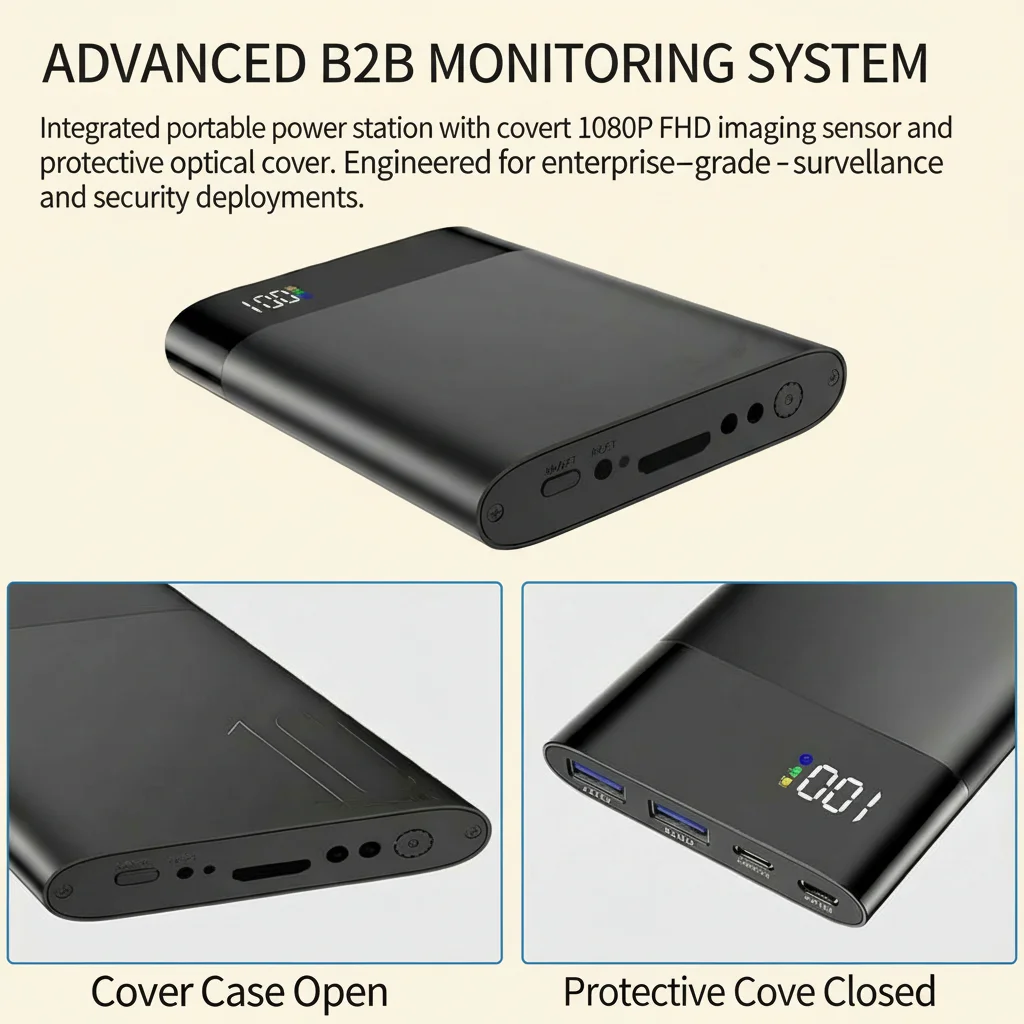
Need help choosing the right camera for your specific application? Browse the Gamma di prodotti QZT Security — from USB charger cameras and EU socket cameras for mains-powered 24/7 deployment, to power bank and pen cameras for mobile use, all backed by EU warehouse stock and technical support.

 English
  Italiano
  Deutsch
  Français
  Español
  Polski