
How to Choose the Best Voice Recorder for Meeting Notes in 2026
If you have ever been in a two-hour strategy meeting, scribbled three pages of notes, and then spent the next day reconstructing what was actually decided — you know exactly why a dedicated voice recorder for business meetings is not a luxury but a productivity tool. Transcribing a one-hour meeting takes 30–90 minutes manually. A good voice recorder with automatic transcription does it in seconds.
But not all voice recorders are built for meeting environments. The device that works well for a journalist interviewing a source in a noisy café performs poorly in a carpeted conference room with six people speaking at variable distances. What matters in a meeting setting is microphone placement, noise filtering, file format compatibility with your transcription workflow, and battery life that survives a full day of back-to-back meetings without dying mid-session.
This guide walks through how to evaluate a voice recorder for professional meeting use — covering the technical specifications that matter, the features that are marketing noise, and the specific product categories most relevant to B2B buyers and corporate users in 2026.
Why Most Smartphones Are the Wrong Tool for Meeting Recording
Every modern smartphone has a microphone and a recording app. For occasional use, this is sufficient. But for professionals who record more than two meetings per week, the smartphone creates three persistent problems that a dedicated recorder solves.
Problem 1: App interruption. A phone call, a notification, or an accidental swipe closes the recording app. Android recording apps are particularly susceptible to being killed by the system to free memory. iOS is more stable but still prioritizes phone calls and calendar alerts over background recording. A dedicated device runs only recording software — it cannot be interrupted by a calendar reminder.
Problem 2: Audio quality degradation from the body. When a phone lies flat on a conference table during a recording, the microphone sits on the underside of the device, facing the table surface. The body of the phone absorbs and reflects sound before it reaches the mic. A dedicated recorder with a top-mounted microphone capsule points toward the sound source and captures clean, unobstructed audio.
Problem 3: Workflow separation. Meeting recordings live in the same app as your personal messages, calendar, and photos. A dedicated recorder creates a separate, organized archive that is searchable by date and labeled by meeting name. When you need to find the recording from the Q3 planning meeting three months ago, you navigate to a folder — not scroll through a list of 200 voice memos mixed with everything else.
The Three Technical Specifications That Actually Matter
Ignore what the marketing copy says about “studio quality” and “professional-grade.” Focus on these three measurements.
Microphone configuration. For a meeting with multiple speakers around a table, a stereo mic with a wide pickup pattern (90°–120°) captures all speakers without requiring the device to be pointed at each person in turn. A directional (cardioid) mic is better for one-on-one interviews where the speaker is directly in front of the device.
For group meetings of 4–8 people, a stereo pair with an omni-directional pickup pattern gives the most natural sound distribution. Devices with a single mono mic compress all speakers into a narrow dynamic range and produce recordings where the person furthest from the microphone sounds distant and muffled.
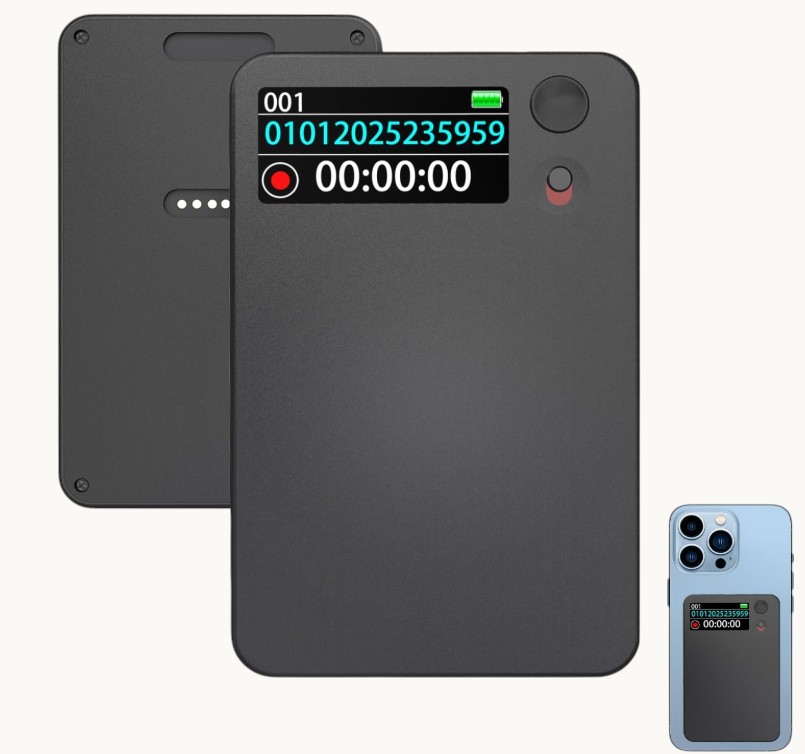
The Q97 Voice Recorder and the Magnetic Voice Recorder 500H from QZT both use dual-mic stereo configurations suitable for multi-person meeting environments. The difference between a $25 device and a $150 device often comes down to mic capsule quality — specifically the signal-to-noise ratio (SNR) of the microphone preamp, measured in decibels. A good meeting recorder has an SNR of 60 dB or above.
Sample rate and bit depth. Audio files for transcription need at minimum 16-bit / 16 kHz. This is the standard for automated speech-to-text services including Otter.ai, rev.com, and Whisper. Files recorded at 8-bit or 8 kHz (common on low-cost devices) produce transcription errors on anything other than single-speaker clarity.
For meetings where you need to hear overlapping speakers — brainstorming sessions, court proceedings, or focus groups — 24-bit / 48 kHz provides the headroom to boost quiet passages without introducing noise. This comes at a file size cost: approximately 170 MB per hour at 24-bit / 48 kHz versus 70 MB per hour at 16-bit / 16 kHz.
Battery life. Meeting recorders are used in back-to-back sessions — a morning sync, an afternoon client call, a late-afternoon project review. A device that dies after three hours of recording is unsuitable for professionals who attend four to six hours of meetings per day.
Look for a minimum of 12 hours continuous recording at standard quality (16-bit / 16 kHz). Some QZT recorder models offer 500-hour standby with motion-activation mode, meaning the device uses no battery until sound is detected — particularly useful for recording sporadic discussions without creating massive files to search through later.
The Feature Categories That Differentiate Meeting Recorders
Once the core specifications are met, evaluate these feature categories based on your specific workflow.
Automatic transcription. Dedicated recorders with built-in transcription (the Q97 uses onboard AI processing) generate text without requiring a cloud subscription. Cloud-based transcription services (Otter, Rev, Trint) offer higher accuracy but require an ongoing subscription — typically $10–$20 per month — and upload your recordings to third-party servers. For confidential board meetings or client discussions involving privileged information, onboard transcription is the safer choice.
Voice activation. VOR (Voice Operated Recording) mode starts recording only when sound exceeds a threshold and pauses when the speaker stops. This is not the same as “smart” or “AI” recording — VOR is a hardware-level feature that has existed since the 1990s. It significantly reduces the time spent reviewing silent recordings and cuts file sizes by 30–50% in meetings with natural pauses. The trade-off is that the first syllable of each sentence may be clipped if the activation threshold is set too high.
Timestamp and chapter markers. Some devices add automatic timestamps at intervals (every 30 minutes, every hour) or when recording resumes after a VOR pause. This makes navigation through a two-hour recording significantly faster — you can jump directly to the point in the meeting where a specific decision was made rather than scrubbing through the full recording.
Storage and file management. 32 GB of internal storage holds approximately 190 hours of audio at standard quality (16-bit / 16 kHz). 64 GB holds 380 hours. For professionals recording multiple meetings per week, 64 GB is the practical minimum. SD card expansion is a useful backup but creates a secondary storage dependency — a lost card is a lost archive. A device with both internal storage and SD card backup gives the most flexibility.
Connecting to Your Existing Workflow: USB, Wi-Fi, and App Integration
A voice recorder that requires a proprietary desktop application to export files creates friction that reduces actual usage. The three export methods to evaluate are:
USB direct export. The most reliable method. Plug the device into any computer via USB, and the storage appears as a removable drive. Drag files to your desktop, upload to a cloud transcription service, or archive to a folder. No software installation, no cloud account, no internet connection required. Every professional recorder should support this.
Wi-Fi direct transfer. Some mid-range and premium recorders offer Wi-Fi transfer to a phone app — files copy to the app without a cable. This is convenient but adds a setup step and a Wi-Fi network dependency. For confidential content, a wired transfer bypasses any risk of files being intercepted on a shared network.
App integration. High-end recorders (Sony, Olympus business line) connect to transcription services through proprietary apps. The Q97 Voice Recorder integrates directly with Whisper for offline transcription through the QZT app. For a B2B buyer evaluating fleet deployment — equipping a 20-person sales team — the cost and complexity of app setup per device matters.
Key consideration for IT departments. Devices that create a USB mass storage connection are recognized as standard removable drives by every enterprise MDM (Mobile Device Management) system. Devices that require proprietary software to access storage may not be MDM-compatible, creating an IT policy violation in regulated industries.
Meeting Scenarios and the Right Recorder Configuration
Not all meetings are the same. Match the device configuration to the recording context.
Small team standups (2–4 people, 30 minutes). A pen-style recorder on the table works well. The device records from close range with clear mic pickup. Models like the WiFi Spy Pen Camera with Audio are suitable here — small enough to sit unobtrusively on the table, with a microphone capsule optimized for close-range speech capture.
Large conference rooms (6–15 people, 1–2 hours). A tabletop unit positioned at the center of the table captures all speakers at similar distances. Device placement matters: avoid placing the recorder near a laptop fan (mechanical noise) or air conditioning vent (white noise). A tabletop unit with a omnidirectional stereo mic like the QZT Voice Recorder product line handles this configuration well.
Client presentations and site visits. A body-worn recorder that can attach to a lapel or sit in a shirt pocket captures audio from the presenter’s perspective. This is a different use case from tabletop recording — the device must be physically small, unobtrusive, and reliable in variable acoustic environments.
Security and confidentiality consideration. The QZT voice recorder product range supports encrypted storage, where files are stored in a proprietary format that requires a PIN to access. For board meetings, legal depositions, or medical consultations, encrypted recording prevents unauthorized playback if the device is lost or stolen.
What B2B Buyers Should Look for in a Meeting Recorder Supplier
If you are evaluating a supplier for a fleet purchase — equipping an entire sales team, legal department, or executive assistant group — the following supplier characteristics predict a better long-term outcome than the raw specification sheet.
Firmware update commitment. Smart recorder devices require periodic firmware updates to patch security vulnerabilities, fix compatibility issues with transcription services, and add features as operating systems evolve. A supplier that has issued updates in the past 12 months for the product line you are evaluating is a better partner than one whose last update was two years ago.
Accessory ecosystem. A recorder that ships with a desktop charging station, a meeting carry case, and an external USB mic adapter is more valuable than a bare device at a lower unit price. The total cost of deployment includes accessories, and a supplier with a mature accessory line reduces your procurement complexity.
Warranty and RMA process. A device that fails six months into a fleet deployment creates a replacement procurement burden. Evaluate the supplier’s warranty period (standard is 12 months), their RMA (Return Merchandise Authorization) process speed, and whether they offer advance replacement (sending a new unit before the old one is returned).
Custom firmware and white-label options. For organizations with specific compliance requirements — encrypted recording, mandatory watermark on all exported audio, or restricted export formats — some manufacturers offer custom firmware development. QZT provides custom firmware options for B2B buyers with minimum order quantities, making it suitable for organizations with specialized recording compliance requirements.
Maintenance and Handling: Getting the Most from a Recording Device
A voice recorder that is mishandled produces recordings that are difficult or impossible to transcribe. The following practices extend both device reliability and recording quality.
Microphone care. The microphone capsule is the most sensitive component and the most commonly damaged. Keep the microphone grille clean — accumulated dust and lint reduce pickup sensitivity, particularly in the high-frequency range that carries consonant sounds (s, t, k sounds). Use a soft-bristled brush, never compressed air, which can damage the diaphragm.
Storage management. Archive completed recordings to a secure location (local drive or encrypted cloud storage) and delete them from the device. A full storage drive does not cause data loss but does cause slow file indexing and can confuse the device’s recording management system. A monthly archive review is a practical habit.
Battery conditioning. LiPo batteries used in modern recorders do not develop memory effect, but they do age. A device that is stored fully discharged for months will require a 30-minute charge before it powers on. For fleet management, consider a monthly maintenance charge routine — connect all devices to power for 30 minutes once per month regardless of battery level. This prevents the deep-discharge lockout that occurs when a LiPo cell falls below 3.2 V for an extended period.
Frequently Asked Questions
Q: Is a digital voice recorder better than a smartphone with a good recording app for meetings?
A: For occasional use, a smartphone is sufficient. For professionals who record more than five meetings per week, a dedicated device is meaningfully better — primarily due to superior microphone quality (the top-mounted capsule versus the bottom-facing phone mic), non-interruptible recording (no app killed by the OS), and organized file management. The workflow improvement is substantial enough that most business users who switch to a dedicated device do not return to phone recording.
Q: What is the minimum recording quality for accurate transcription via Whisper or Otter?
A: 16-bit / 16 kHz mono is the minimum for reliable transcription. 24-bit / 48 kHz stereo is better, particularly for multi-speaker meetings where speaker identification in the transcript matters. Anything below 16-bit / 16 kHz will produce transcription errors that require manual correction, negating the time savings of automated transcription.
Q: How do I handle confidential recordings where GDPR or HIPAA compliance applies?
A: Both frameworks apply when recording contains personal data — client names, medical information, or identifying details in a business context. Solutions include: use a device with encrypted storage (files are unreadable without PIN), process transcription locally without uploading to a cloud service, and establish a clear retention policy (delete recordings after X days or after meeting notes have been finalized). QZT recorder products with encrypted storage are designed for this compliance context.
Q: Should I inform meeting participants that I am recording?
A: In most jurisdictions, recording a meeting you are a participant in requires consent from at least one party to the conversation (one-party consent law, common in the UK and most US states). Informing all participants is better practice — it is transparent, avoids legal risk, and produces better recordings because speakers know to speak clearly and avoid overlap. For legal, medical, or HR contexts, inform all parties and note consent in the meeting agenda.
Q: How long should meeting recordings be retained?
A: Depends on the context. Project kickoff and decision meetings: retain until project completion plus 30 days. Contract negotiation meetings: retain per your document retention policy (typically 5–7 years). Board meetings and executive sessions: retain per corporate governance policy (typically 7 years). Personal notes for day-to-day reference: retain until meeting notes have been finalized and stored in your document management system.
Conclusion
Choosing the right voice recorder for meeting notes is a decision about workflow more than it is about specifications. The device that produces the best outcomes for a sales team attending eight meetings per week is not the same device that works for a journalist conducting field interviews or a medical professional recording patient consultations.
For most professional meeting environments — 2–8 participants, 30–90 minutes, moderate room acoustics — the key specifications are: stereo dual-mic configuration, 16-bit / 16 kHz minimum sample rate, 12+ hours battery life, USB direct export, and onboard storage of 32 GB or above. The features that differentiate — VOR mode, encrypted storage, automatic transcription — should be evaluated against your specific compliance and workflow requirements rather than chosen as universal add-ons.
For B2B buyers evaluating fleet deployment, the supplier relationship matters as much as the device specification. Firmware update commitment, accessory availability, warranty terms, and custom firmware options for compliance requirements are the factors that determine whether a fleet purchase delivers sustained value or creates ongoing procurement overhead.
The goal is simple: every meeting is documented completely, every recording is findable, and every transcription is accurate. A well-chosen recorder is the infrastructure that makes that possible.

 English
  Italiano
  Deutsch
  Français
  Español
  Polski